The home node: where your assistant keeps its memory
On Thursday you ask your assistant what the plumber said on Monday about the boiler. One of two things happens. Either it has no idea, because every conversation starts from nothing. Or it answers instantly — because everything you have said near it for the past two years sits in a vendor’s data centre, indexed, under an account that company can read, re-price or close.
Neither is what you wanted. You wanted it to remember, and you wanted the memory to be yours.
The real cause: memory has to live somewhere
An assistant that knows you is mostly memory: who said what, what you decided, what you prefer, what is still open. Carried devices are small on purpose. A card on a lanyard has no room for years of context, and it can be left in a taxi. So the memory goes to the only other place on offer, the vendor’s cloud. From then on your past is an asset on somebody else’s balance sheet, and you rent access to it.
Where an assistant’s memory usually ends up
In someone else’s account. A breach, a policy change, a legal request or an acquisition, and your memory is read by people you never chose.
On the device you lose. If the memory lives only in your pocket, losing the device means losing it — or, worse, someone else finding it.
Nowhere. Assistants that forget everything after each session are private in the least useful way.
Everywhere at once. The assistants in your phone, your speaker and your car each keep a partial copy, synced to three companies, and none of them is complete.
Behind a subscription. Stop paying, and the memory leaves with the plan.
A box on a shelf that remembers
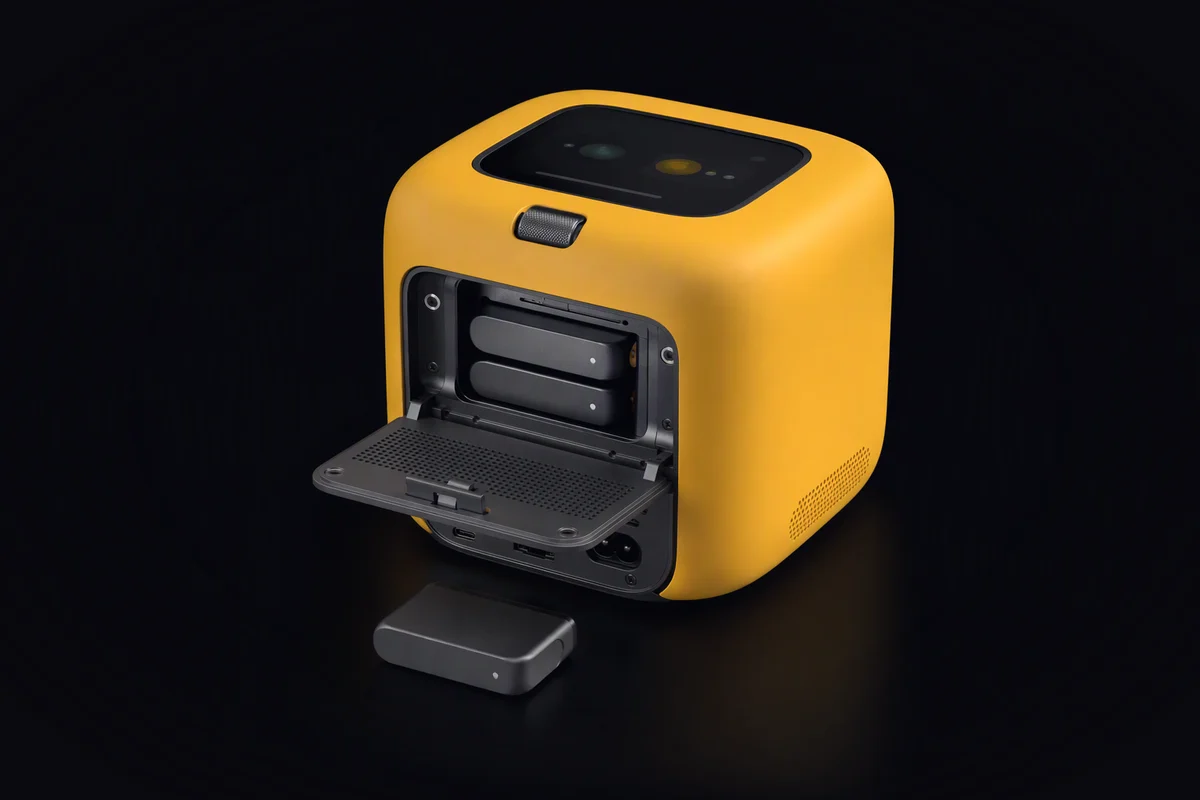
KyberDeck Node is the form that stays home. It is designed to be always on and low-power, with a local memory store, a speaker grille and a light ring. Its main job is unglamorous: to hold the long memory your assistant works from.
Memory on your shelf. The Node keeps the long memory encrypted, readable by nobody but your KyberBot. What it means for an assistant to know you — and why that knowledge has to stay yours — is the subject of an assistant that knows you.
The carried forms hold the day; the Node holds the rest. The card, the band and the pocket deck carry what they need for today and work offline. When they are home, or within reach, they sync with the Node. A lost card is meant to be a small loss: it carries less, and its access can be withdrawn from home.
A bridge. The Node links your card, your band, your pocket deck and a robot running a KyberDeck Core, so they act as one assistant rather than five.
Jobs too big for a pocket, too personal for a server. Summarising a month of notes, searching years of decisions, running a larger model than a carried device can hold: the Node is where KyberBot sends work that should not leave the house.
Spare capacity, only if you want it. A Node sits idle most of the night. If you choose, it can lend that spare capacity to KyberFusion and be settled in tokens for the compute it provides — off by default, and walled off from your memory. A token is a unit of settlement for compute, not an investment, and nothing here promises a return. This is not an offer. How that works, and what a cloud node may and may not learn about you, is covered in from a node on your shelf to a node in the network and what a cloud node knows about you.
A box on a shelf can still fail, burn or be stolen, so memory deserves a backup: an encrypted copy that only your KyberBot can open, kept wherever you decide — a second drive, a second Node at a relative’s. The design goal is that a copy kept elsewhere reveals nothing to whoever holds it.
The Node is in design. Nothing is for sale, and every feature above is a target, not a measured result. The rest of the family is on the homepage, and the reasons there are five forms at all are in buy it or build it.
A test you can run today
Most large assistant platforms let you download what they keep about you. Request that export from the assistant you use most, and when it arrives, answer four questions:
- How far back does it go?
- Could you delete one item — one conversation, one fact — without deleting everything?
- Who besides you could read it today?
- What happens to it if you cancel?
If the answers surprise you, you have found the memory problem. A home node is our answer to it.
- KyberDeck Node
- memory
- home
- privacy